Kineticium
Project Overview
Kineticium is a first-person movement shooter where the faster you go, the more damage you deal and the less damage you take. I made it for my final year project in college in about 4 months in Unity, with my main focus on the mechanics rather than making it look pretty. I did add some minor artistic aspects to it, such as the cartoon-like outline on the guns and enemies, as well as bullet trails and bullet holes in walls.
Development Challenges
One of the biggest struggles I had in this project was definitely level design. I did not enjoy doing level design, and thus did not have experience doing it. This became a significant issue when I realised not only did I have to make the maps, I had to design them in such a way to encourage the players to utilise most, if not all, the game's mechanics. Looking back at this project, I'm still not entirely satisfied with it as I think all the levels except the tutorial level don't give the player much freedom, whilst encouraging engagement with the mechanics.
Technical Discussion
From a technical standpoint, I'm still quite happy with what I did in this project, even if there are a few nitpicks I would change, such as adding a bit more to the enemies' AI, and how the weapon damage scaling worked. From a game design perspective, I feel that with everything I learnt up until now, I'd make quite a few changes, such as simple things like Having a way to keep track of when you can next fire a shot, and giving the player more or clearer feedback to their actions, whether that be hitting an enemy or building up a lot of speed.
Code Snippets:
public class PlayerMovement : MonoBehaviour
{
    [Header("Movement")]

    public float MoveSpeed;
    public float WallRunSpeed;
    public float GroundDrag;
    public float TopXSpeed;
    public float TopYSpeed;
    public float TopZSpeed;

    public float JumpForce;
    public float JumpCooldown;
    public float AirMultiplier;

    private bool Accelerating;
    float HorizontalInput;
    float VerticalInput;

    public float DamageMultiplier;

    public float DamageReduction;

    public Transform Orientation;

    Vector3 MoveDirection;

    Rigidbody rb;

    [Header("GroundCheck")]

    //public float PlayerHeight;
    public Transform FootPos;
    public float CheckRadius;
    public LayerMask WhatIsGround;
    public bool IsGrounded;
    public float PlayerHeight;

    public CharacterStates currentState;

    [Header("UI Elements")]

    public TMP_Text Speedometer;
    public Slider SpeedSlider;
    public float CurrentVelocity;

    public CameraControls _cameraControls;

    public float roundedVelocity;

    public enum CharacterStates
    {
        walking,
        sprinting,
        wallrunning,
        crouching,
        sliding
    }

    void Start()
    {
        rb = GetComponent();
        rb.freezeRotation = true;

        WallRunSpeed= MoveSpeed;
    }


    void Update()
    {
        //Ground Check
        IsGrounded = Physics.Raycast(transform.position, Vector3.down, PlayerHeight * 0.5f + 0.2f, WhatIsGround);

        MyInput();

        //Speedometer
        CurrentVelocity = rb.linearVelocity.magnitude;
        roundedVelocity = Mathf.Round(CurrentVelocity);
        Speedometer.text = roundedVelocity.ToString();
        SpeedSlider.value = roundedVelocity / 30;
        DamageMultiplier = roundedVelocity * 0.25f;
        DamageReduction = roundedVelocity / 5;

        if(roundedVelocity >= 10)
        {
            _cameraControls.Highspeed = true;
            _cameraControls.PeakSpeed = false;
        }
        if(roundedVelocity<10)
        {
            _cameraControls.Highspeed = false;
            _cameraControls.PeakSpeed = false;
        }
        if (roundedVelocity >= 17)
        {
            _cameraControls.Highspeed = false;
            _cameraControls.PeakSpeed = true;
        }
    }

    private void FixedUpdate()
    {
        MovePlayer();
    }

    //Input Manager
    private void MyInput()
    {
        HorizontalInput = Input.GetAxisRaw("Horizontal");
        VerticalInput = Input.GetAxisRaw("Vertical");

        if(Input.GetKeyDown(KeyCode.Space) && IsGrounded)
        {
            Jump();
        }
        if (Input.GetKey(KeyCode.F))
        {
            rb.linearDamping = GroundDrag;
        }
        else
        {
            rb.linearDamping = 0;
        }
    }

    //Movement Behaviour
    private void MovePlayer()
    {
        MoveDirection = Orientation.forward * VerticalInput + Orientation.right * HorizontalInput;

        if(IsGrounded)
        {
            //rb.AddForce(MoveDirection.normalized * MoveSpeed * 10f, ForceMode.Force);
            rb.linearVelocity += MoveDirection * (MoveSpeed * 1.5f * Time.deltaTime);
        }
        else if(!IsGrounded)
        {
            rb.linearVelocity += MoveDirection * (MoveSpeed * 1.5f * Time.deltaTime);
        }

        rb.linearVelocity = new Vector3(
            Mathf.Clamp(rb.linearVelocity.x, (-TopXSpeed), TopXSpeed),
            Mathf.Clamp(rb.linearVelocity.y,  -TopYSpeed, TopYSpeed),
            Mathf.Clamp(rb.linearVelocity.z, (-TopZSpeed), TopZSpeed));
    }

    //Jump Behaviour
    private void Jump()
    {
        rb.linearVelocity = new Vector3 (rb.linearVelocity.x, 0f, rb.linearVelocity.z);

        rb.AddForce(transform.up * JumpForce, ForceMode.Impulse);
    }
}
public class EnemyAI : MonoBehaviour
{
    [Header("Look at Player")]

    public Transform Target;
    public float DetectionRange;
    public float RotationSpeed;

    [Header("Pathfinding")]

    public Vector3 Playerrange;
    public NavMeshAgent EnemyAgent;
    public float Chaserange;

    [Header("Shooting")]

    public Transform FirePoint;
    bool canFire;
    [SerializeField] float cooldown;
    [SerializeField] float currentCoolDown;
    [SerializeField] float Damage;
    [SerializeField] private TrailRenderer BulletTrail;

    [Header("Sounds")]
    public AudioSource EnemySource;
    public AudioClip EGunshot;
    public AudioClip Alert;

    private bool Alerted;
    public bool StopRepeat;


    // Start is called before the first frame update
    void Start()
    {
        EnemyAgent = GetComponent();
        EnemySource = GetComponent();
        StopRepeat= false;
    }

    // Update is called once per frame
    void Update()
    {
        //Shooting check and looking towards player
        if (Vector3.Distance(Target.position, transform.position) < DetectionRange)
        {
            Vector3 TargetDirection = Target.position - transform.position;

            float SingleStep = RotationSpeed * Time.deltaTime;

            Vector3 NewDirection = Vector3.RotateTowards(transform.forward, TargetDirection, SingleStep, 0.0f);
            //NewDirection.y = 0; this will lock the y axis rotation.
            transform.rotation = Quaternion.LookRotation(NewDirection);
            Shooting();
        }

        //Chase player check
        if(Vector3.Distance(Target.position, transform.position) < Chaserange)
        {
            EnemyAgent.SetDestination(Target.position);
            Alerted = true;
        }
        else
        {
            return;
        }

        if (currentCoolDown > 0)
        {
            currentCoolDown -= Time.deltaTime;

            return;
        }
        canFire = true;
        currentCoolDown = cooldown;
        if(Alerted&!StopRepeat)
        {
            EnemySource.PlayOneShot(Alert);
            StopRepeat = true;
        }
        else
        {
            return;
        }
    }

    //Shoot Method
    public void Shooting()
    {
        RaycastHit hit;

       if( Physics.Raycast(FirePoint.position, transform.TransformDirection(Vector3.forward), out hit, DetectionRange))
       {
            Debug.DrawRay(FirePoint.position, transform.TransformDirection(Vector3.forward) * hit.distance, Color.yellow);


            HealthScript healthScript = hit.transform.GetComponent();
            PlayerMovement Playermove = hit.transform.GetComponent();


           if ((hit.transform.tag == "Player") &&(canFire))
           {
                canFire = false;
                healthScript.TakeDamage(Mathf.Round(Damage/Playermove.DamageReduction));
                TrailRenderer trail = Instantiate(BulletTrail,FirePoint.position, Quaternion.identity);

                StartCoroutine(SpawnTrail(trail, hit));

                EnemySource.PlayOneShot(EGunshot);
           }
       }
    }

    //Trail Rendering coroutine
    private IEnumerator SpawnTrail(TrailRenderer Trail, RaycastHit Hit)
    {
        float time = 0;

        Vector3 StartPosition = Trail.transform.position;

        while (time < 1)
        {
            Trail.transform.position = Vector3.Lerp(StartPosition, Hit.point, time);
            time += Time.deltaTime/Trail.time;

            yield return null;
        }
        Trail.transform.position = Hit.point;
        Destroy(Trail.gameObject, Trail.time);
    }
}
A Keen Eye
Project Overview
A keen eye is an isometric/top-down puzzle game where you have to find the odd object out in a sea of them, whilst having intentionally limited controls. I made this in 9 weeks during one of the last modules in my 1st year at University, where my main focus was trying to keep the scope as low as I could since this was my first time using Unreal's Blueprints without any assistance.
Development Challenges
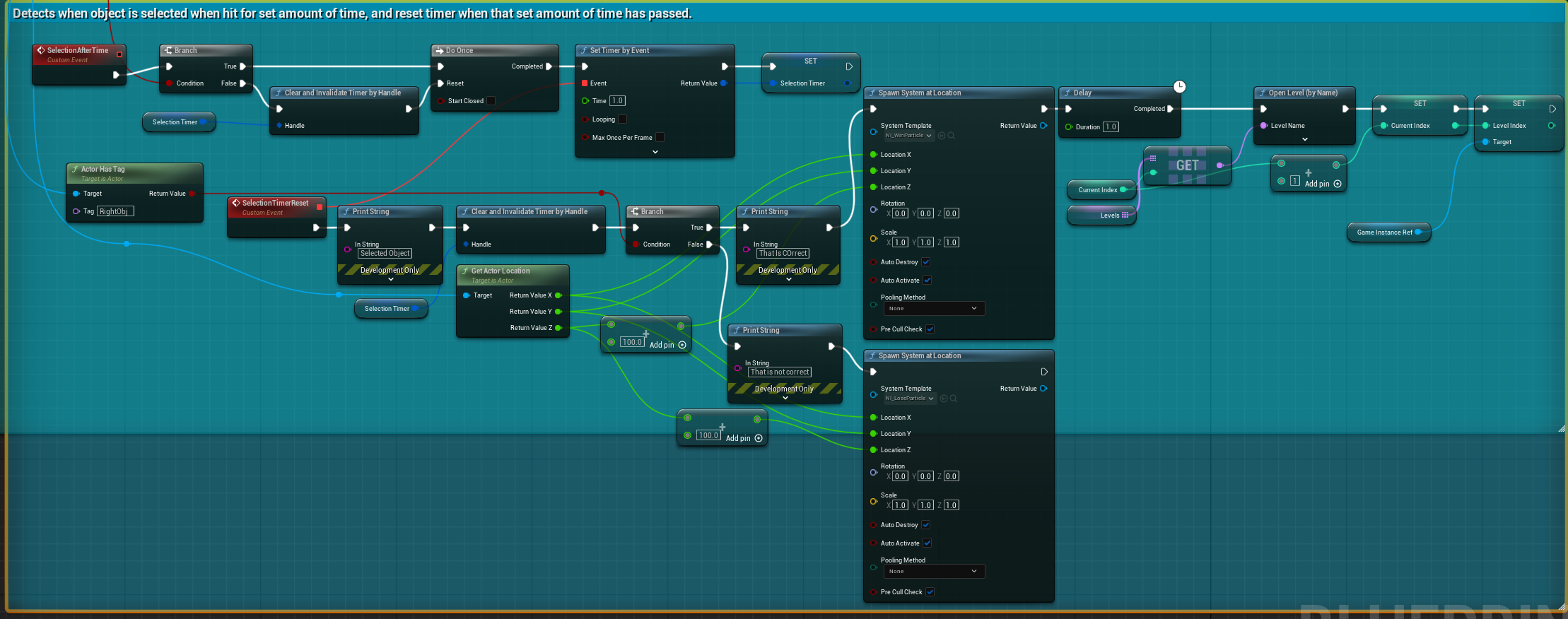
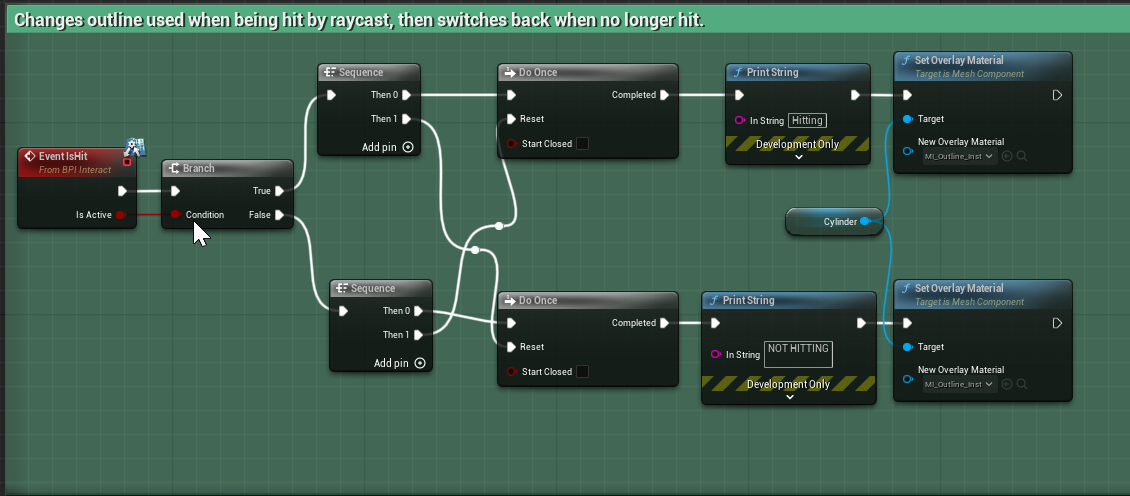
One of the biggest struggles I had was with the green outline for showing the player what object you are currently looking at, where, if you looked at two objects in quick succession, it would highlight both objects rather than the latest one. This stumped me for quite a while until I finally resolved it by keeping track of what the last object you looked at was, and checking every 0.25ish seconds if the object you're looking at is the same, and if it isn't, disable the outline on the last object so only the current object has it.
Technical Discussion
From a technical standpoint, I do feel the game is really basic, and didn't really push me outside any real comfort zones, but it still felt well-scoped and reached where it needed to be for the deadline despite the hiccups. From a game design perspective, I feel like there isn't much to expand upon in terms of gameplay, my choice for such simple and limiting controls was a double-edged sword, where it meant that it was relatively easy to figure out the controls, but where it goes beyond that isn't clear. It also doesn't give the player much freedom as all they can do is look around and spin a level, there isn't really anything else to it. My biggest takeaway is that any mechanics I make in the future need to find the balance between easy to pick up, but also has some depth to it for those wanting to experiment or take things a step up.
Blueprint Snippets:
Arena Movement Tool
Project Overview
The Arena Movement Tool was a tool I made to assist with creating arena-based movement for bosses, whilst also creating a camera tracking and orbiting system in the process, without realising. I made this in 9 weeks for my Tools Development Module in my 2nd year of University, where I gave myself the challenge of doing everything in C++, with the only semblance of Blueprint usage being the component itself.
Development Challenges
The biggest struggle I had for this project was the main orbit behaviour, as I tried looking into physics and circular motion to make it behave like the orbit of a planet or satellite, despite the fact that I had no experience with A-Level physics. Instead, I pivoted to making it move in 360 intervals, mimicking the orbiting behaviour whilst not needing any of that advanced physics.
Technical Discussion
From a technical standpoint, it is a very simple tool. I once again tried to keep the scope low and not do anything too complicated to reach completion in that 9-week timeframe. When I reached the end and started bug testing it, I was pleasantly surprised to find uses for the tool I had not realised before, such as easy object tracking for the camera to use. I also struggled to find any bugs when doing the testing, except for null ptrs, which were easily fixed with a check for if the object assigned was null, and only allowing the behaviour to work if it wasn't.
Code Snippets:
	//Behaviour for looking at a specific object assigned by the user
	if (IsLookAt)
	{

		if (ObjectToLookAt != nullptr)
		{
			//Checks where Assigned object is
			FVector LookAtVector = ObjectToLookAt->GetActorLocation();

			//Gets location of component parent
			FVector ThisVector = ParentActor->GetActorLocation();

			//Sets parent rotation to always look at assigned object
			ParentActor->SetActorRotation(UKismetMathLibrary::FindLookAtRotation(ThisVector, LookAtVector));

			//UE_LOG(LogTemp, Log ,TEXT("ParentActor: %s"), *ParentActor->GetActorRotation().ToString());
		}
		else
		{
			return;
		}
	}
	    //Gets location of component parent
      	FVector ThisVector = ParentActor->GetActorLocation();

      	FVector OrbitingVector = OrbitingPoint->GetActorLocation();


      	FVector Radius = FVector(1, 0, 0)*OrbitingRadius;

		//Keeps rate of orbit consistent
      	CurrentOrbitPosition += (OrbitingSpeed*DeltaTime);

      	//Allows continuous movement
      	if (CurrentOrbitPosition >360.0f)
      	{
      		CurrentOrbitPosition = 1;
      	}

      	FVector OrbitForce = Radius.RotateAngleAxis(CurrentOrbitPosition, FVector(0.0f, 0.0f, 1.0f));

      	OrbitingVector.X += OrbitForce.X;
      	OrbitingVector.Y += OrbitForce.Y;
      	OrbitingVector.Z += OrbitForce.Z;

      	ParentActor->SetActorLocation(OrbitingVector);